Document Lifecycle Management
Manage SOPs, work instructions, forms, policies and records from draft through review, approval, effective use and retirement.

Manage regulated documents, versions, workflows, signatures, reviews, training and audit evidence in one controlled platform.
eDOCS helps pharmaceutical teams create, review, approve, distribute, periodically review and retire controlled documentation. It supports SOPs, work instructions, policies, forms and records with structured lifecycle management, traceable versions, electronic signature evidence and audit-friendly history.
Pharmaceutical document management involves authors, reviewers, approvers, effective dates, training obligations, periodic reviews, retention requirements, controlled copies and audit evidence. When documents are managed across file shares, emails and spreadsheets, teams lose confidence in which version is current, who approved it and what follow-up is still required.
eDOCS brings document records, files, versions, workflows, signatures, reviews, training and distribution evidence into one structured control layer.
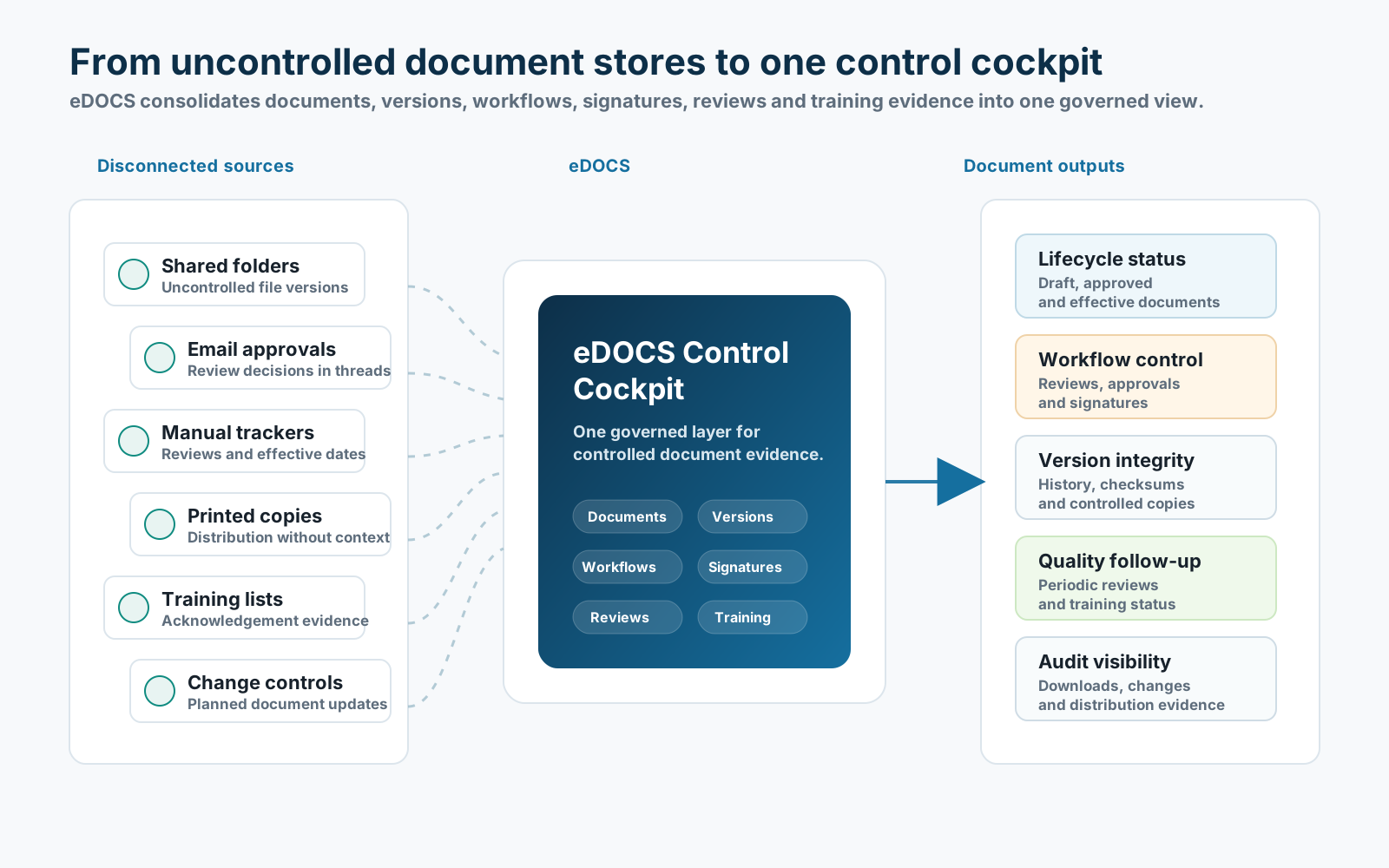
eDOCS connects document lifecycle control, workflow execution, training, reviews and compliance evidence in one operational platform.
Manage SOPs, work instructions, forms, policies and records from draft through review, approval, effective use and retirement.
Track major and minor versions, file history, change descriptions, controlled copies and SHA-256 checksums for uploaded source files.
Control lifecycle transitions with workflow steps, permissions, required comments and optional electronic signature requirements.
Support password re-authentication, signature meaning, printed name, timestamp and immutable signature records for controlled approvals.
Organize documents into libraries with configurable categories, workflows, role definitions and custom metadata fields.
Schedule and track review cycles, overdue reviews, no-change outcomes, revision needs and document retirement decisions.
Assign training when regulated documents become effective and capture password-authenticated acknowledgement evidence.
Link documents to change controls, track planned document updates and preserve readiness evidence before closure.
Record create, update, upload, download, status change, signature and controlled distribution events in audit-friendly history.
Use optional AI-assisted checks for document readiness, missing metadata, change-control context and structured review support.
From document creation to effective use, training, periodic review and retirement, eDOCS keeps controlled content visible and traceable.
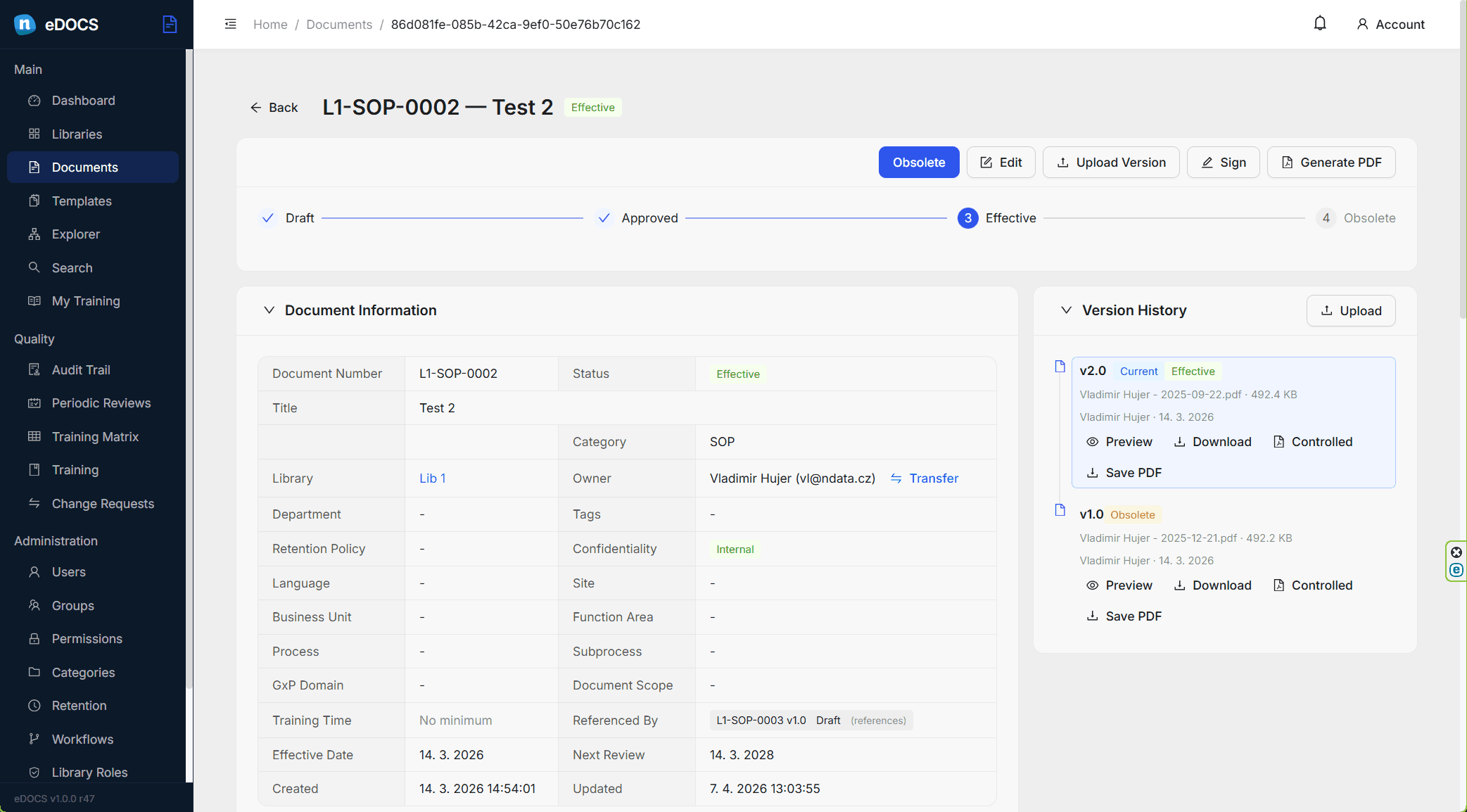
Create document records with category, owner, department, retention policy, review date, metadata and linked change control. eDOCS keeps the lifecycle visible from draft to in review, approved, effective, superseded or obsolete.
Each version stores its file, version label, checksum, change description, workflow status and controlled-copy output. Teams can understand which version is latest, which one is effective and how the document changed over time.
Workflow definitions determine allowed transitions, required rights, comments and signatures. Users see available actions based on their permissions, and completed approvals remain traceable through signature and audit history.
Periodic reviews, training assignments and change controls are linked to the document lifecycle. Quality teams can see what is overdue, what requires acknowledgement and which planned changes still need document implementation.
Search across document numbers, titles, tags, departments, metadata and indexed content. Folder views and library dashboards help teams navigate large controlled-document repositories without losing governance context.
eDOCS is designed as the controlled document management layer in the e-line ecosystem. It owns regulated documents, versions, workflows, controlled copies and document evidence, while connecting with surrounding systems that need approved documents, references, training status or change-control context.
eDOCS does not replace specialized operational systems. It provides controlled document governance for them.
Artwork execution follows regulatory and launch change context.
eDOCS answers daily quality and operational questions around controlled content, evidence and lifecycle status.
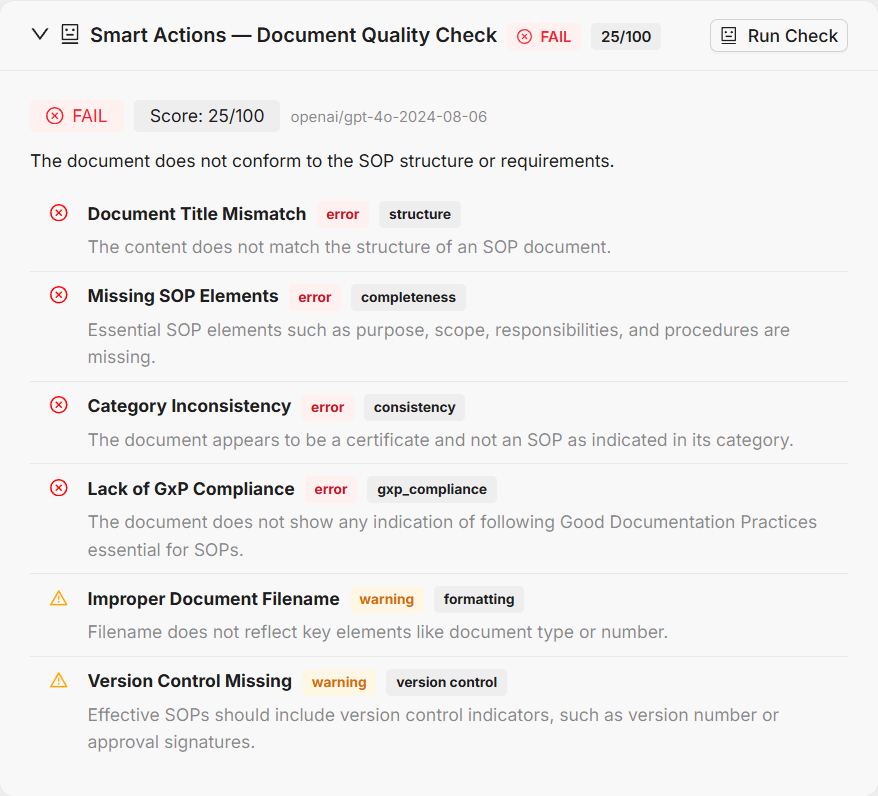
eDOCS Smart Actions are launched from the selected document version, library, change control or quality follow-up view. The system assembles document content, metadata, workflow, version, training and change-control context and asks AI to perform a specific controlled check, such as document quality review, PII screening, version comparison or library health analysis.
eDOCS supports controlled document categories, versioned files, effective dates, review intervals, retention policies, training acknowledgement, controlled distribution, electronic signature evidence, audit trail, role-based access and library-specific metadata. It is built for teams that need more than a file repository, without turning document control into a generic content portal.
See how eDOCS can help your teams manage controlled documents, workflows, signatures, reviews, training and audit evidence in one connected platform.
Request a Demo